Compare across jurisdictions
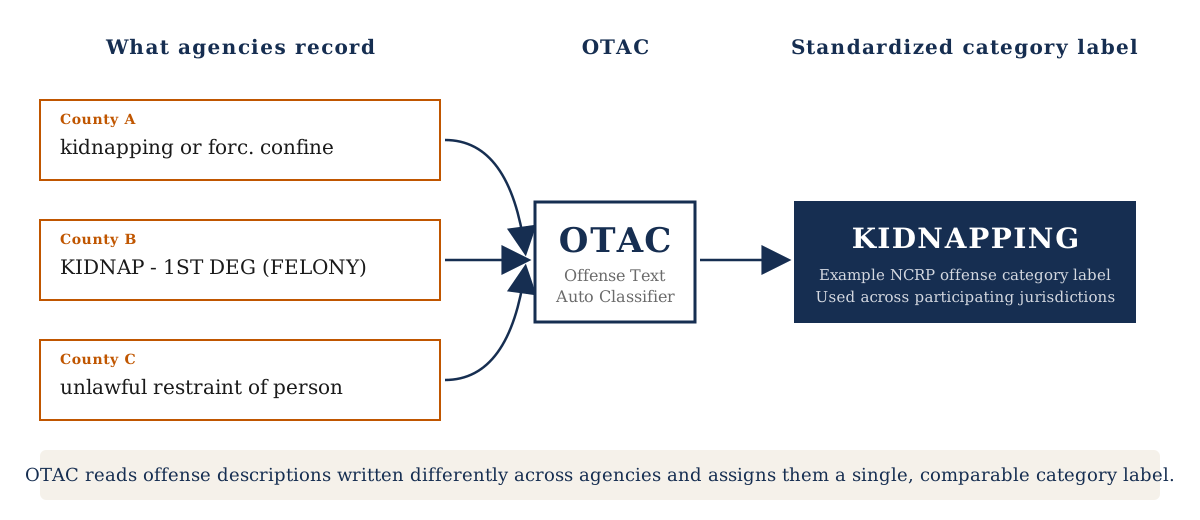
Agencies may describe the same offense differently. OTAC helps map those records to one standardized category.


OTAC is a free tool from the Bureau of Justice Statistics that turns free-text offense descriptions into standardized offense categories, making criminal justice data easier to compare across jurisdictions.
Select your operating system for step-by-step setup instructions, including Docker installation and the OTAC download.
Criminal justice agencies record offenses in many ways. The same conduct might appear in one county's records as "kidnapping or forc. confine" and in another's as "KIDNAP - 1ST DEG (FELONY)". That inconsistency makes it hard to compare data across agencies, track cases as they move through the system, or produce reliable national statistics.
OTAC, the Offense Text Auto Classifier, addresses this problem. It reads free-text offense descriptions and matches them to standardized categories from the BJS National Corrections Reporting Program (NCRP). Those categories and their related documentation are also available in the NCRP Resource Guide and Offense Code Crosswalk. OTAC runs locally on a user's computer: agencies and researchers can classify their own data without uploading it anywhere. Your data are never sent to the internet nor stored by OTAC.
Practical benefits for agencies, researchers, and policymakers:
Agencies may describe the same offense differently. OTAC helps map those records to one standardized category.
Manual coding of large offense datasets takes time. OTAC narrows the review work and helps teams move faster.
Hand-coded offense data can vary across analysts. OTAC applies the same classification logic each time.
Consistent offense coding supports tracking through arrest, courts, corrections, and reentry.
OTAC is most accurate on well-defined offenses with distinctive vocabulary and less reliable for ambiguous or overlapping categories. We recommend using OTAC as a semi-supervised tool: let it produce a short list of likely categories for each offense, then have a reviewer confirm the correct one. This is faster than coding from scratch and more reliable than fully automated classification.
Current scope: The current version supports felony-level offenses only.
Criminal justice datasets often contain free-text offense descriptions that differ across jurisdictions even when they refer to similar conduct. For comparison across states, agencies, or systems, those descriptions often need to be grouped into standardized categories. OTAC helps make that work faster, more consistent, and easier to review.
OTAC is designed to support a structured review process for offense coding. It helps teams move from inconsistent free-text descriptions to more comparable NCRP category labels while keeping a human reviewer in the loop.
Once running, OTAC opens in your browser at http://localhost:8501.
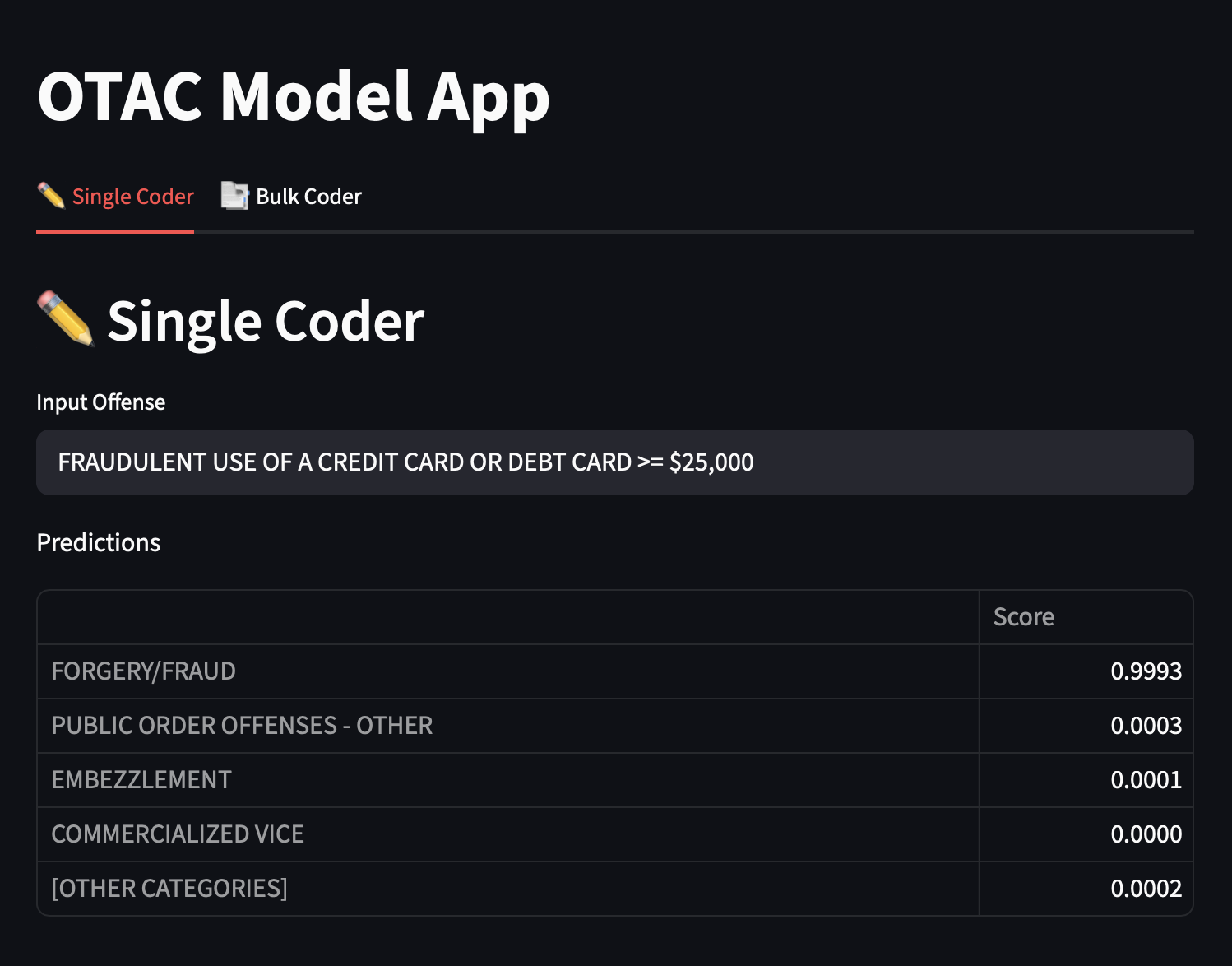
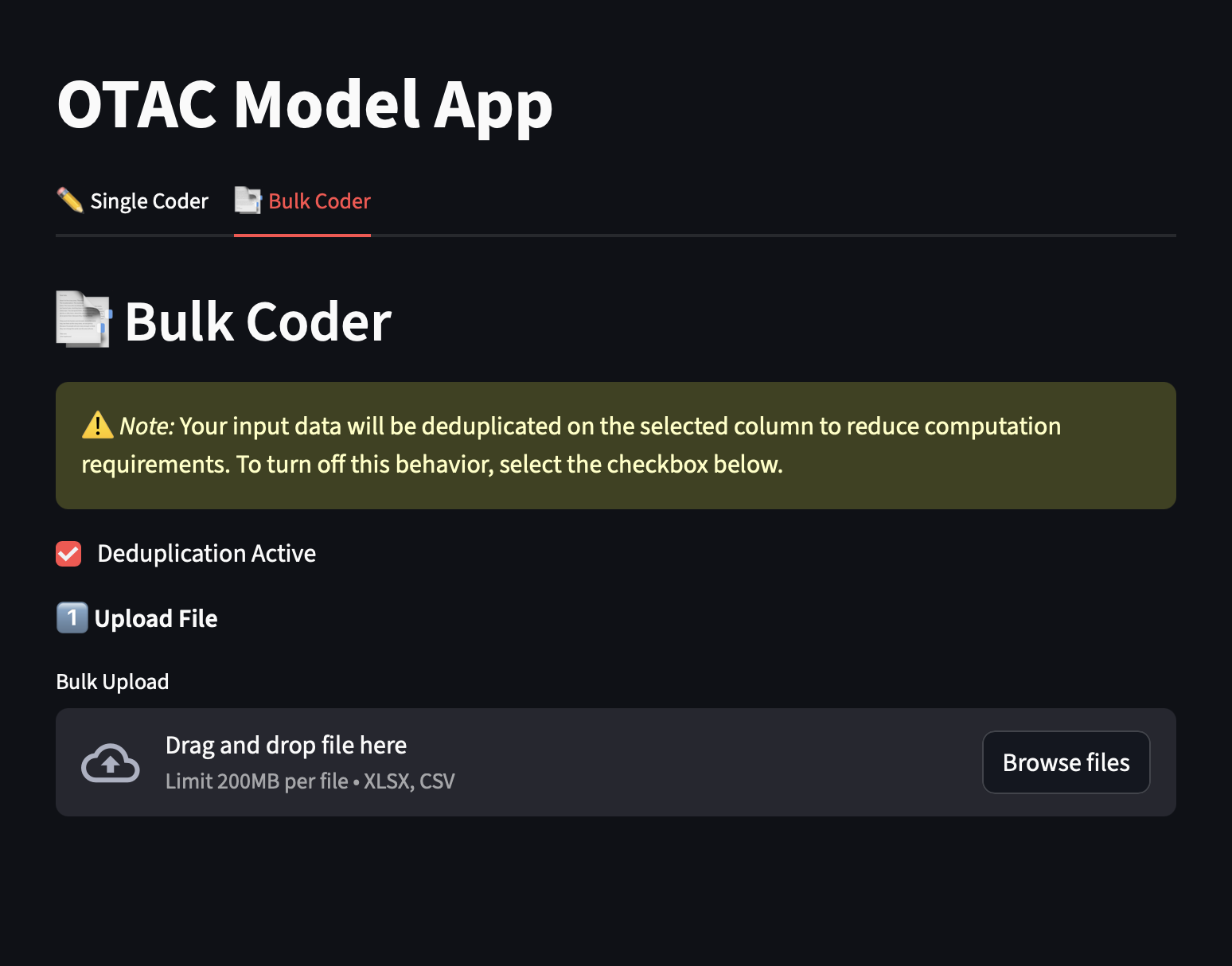
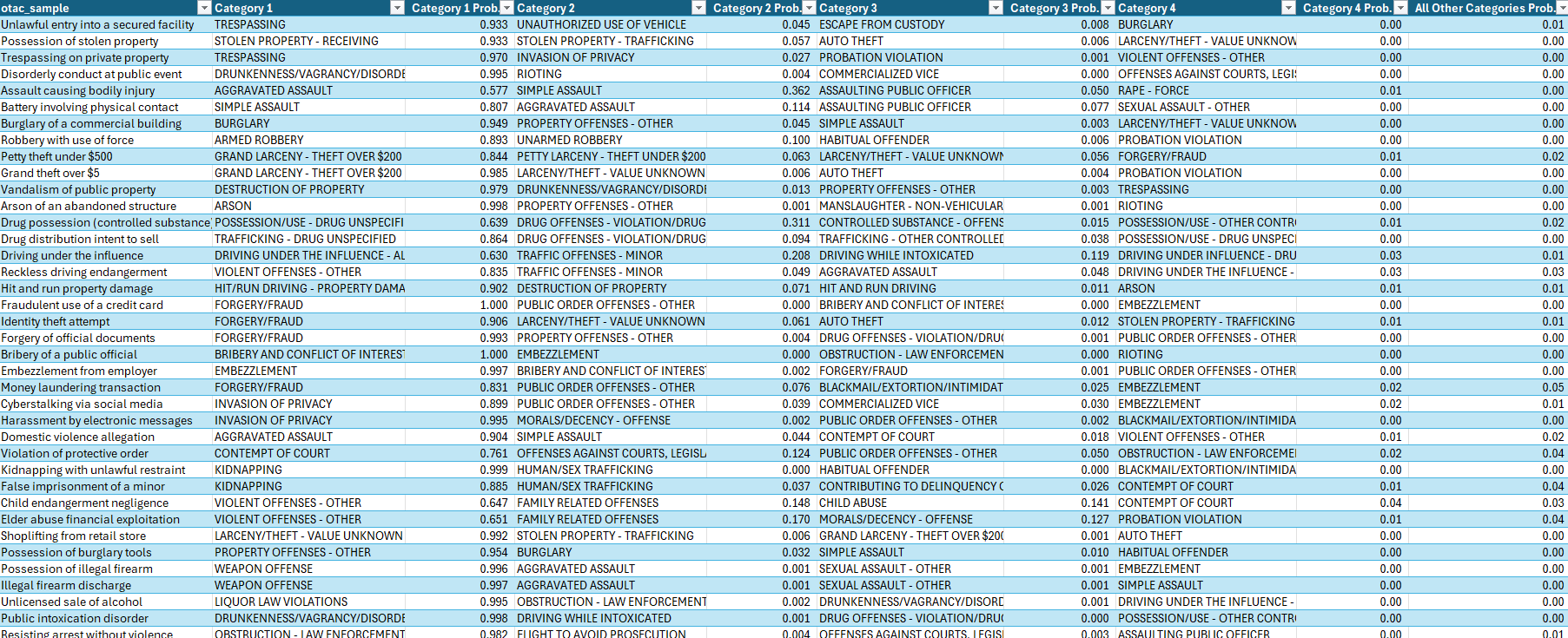
OTAC works by standardizing the free-text offense descriptions used by law enforcement, prosecutors, court clerks, and other justice agencies into a common set of NCRP offense categories. It uses a natural language processing model to predict likely categories from the wording in each description. The methodology underlying OTAC is described in a peer-reviewed publication in the American Journal of Criminal Justice. See publication ↓
OTAC is designed to take offense descriptions that are written differently across jurisdictions and map them into one common NCRP category label that can be reviewed and used more consistently.
OTAC uses a transformer-based natural language processing model, which evaluates the frequency and relationships of words in a text string and applies those relationships to classification. When the model finds word combinations that are frequently associated with a classification, it will suggest that classification more often. The OTAC model was trained using classifications from the NCRP Offense Code Crosswalk and additional county court data with classifications validated by criminal justice experts.
The model learns from offense descriptions that have already been matched to the correct NCRP category.
The model breaks the input text into individual tokens, or words the computer can analyze.
The model evaluates how the words relate to one another and which combinations are associated with the known category.
This process is repeated across many labeled examples so the model can recognize similar patterns in new text.
With enough examples, the model learns recurring word patterns that signal a likely offense category.
OTAC’s accuracy depends on the offense. Straightforward categories classify more cleanly, while ambiguous ones need human review. In validation work using plain-text offenses from two county court datasets, OTAC included the correct offense category in its top-five predictions roughly 90% of the time.
of the time, OTAC's top-five predictions include the correct offense category.
Tested on two county court datasets the model had never seen.
Validation results from two county court datasets show strong top-five prediction performance, while reinforcing the need for human review.
The User Guide covers installation, setup, usage, troubleshooting, and command-line reference for both Windows and Mac. A copy is included in the OTAC download for offline reference.
After extracting OTAC_Desktop.zip, you will have a folder containing:
| File | What it does |
|---|---|
docker-compose.yml | Docker configuration — tells Docker how to run OTAC |
Dockerfile.microsoft | Docker build instructions — used automatically on first run |
requirements-docker.txt | Python package list — used automatically during build |
otac-0.1.0-py3-none-any.whl | The OTAC application package (approximately 80 MB) |
otac_sample.csv | 100 sample offense strings — use this to test first |
OTAC_USER_GUIDE.html | User guide — installation, usage, troubleshooting, and command-line reference. Open in any browser. |
| Requirement | Details |
|---|---|
| Computer | Windows 10 or later, or Mac (2016 or later) |
| Disk space | At least 6 GB of free disk space |
| RAM | At least 8 GB (16 GB recommended) |
| Internet | Required once during first-time setup only |
| Time | 20–30 minutes the first time; under 30 seconds after that |
Select your operating system for complete step-by-step setup instructions, including Docker installation, terminal navigation, and how to start and stop OTAC:
| Problem | Solution |
|---|---|
| "Docker is not installed" | Follow the Docker installation instructions in your Windows or Mac setup guide. |
| "Docker is not running" | Open Docker Desktop and wait for the whale icon to stop animating. |
| Browser shows a blank page or error | OTAC takes about 60 seconds to finish loading the first time you open the browser. Wait 30–60 seconds, then press F5 (Windows) or Cmd + R (Mac) to refresh. |
| "Docker build failed" (first run) | Check your internet connection. A corporate firewall may need IT to allow Docker Hub access. |
| Page loads but looks broken | Try a different browser (Chrome, Edge, or Firefox). |
| Need more help | See the Complete User Guide — Command-Line Reference for detailed command-line instructions and error messages. |
No. OTAC runs entirely on your local computer. Your offense data never leaves your machine.
Only during the very first setup (to build the Docker image). After that, OTAC works completely offline.
| File size | Approximate time |
|---|---|
| 100 rows | 10–30 seconds |
| 1,000 rows | 1–3 minutes |
| 10,000 rows | 10–20 minutes |
OTAC returns ranked predictions for standardized NCRP offense categories, along with confidence scores to help reviewers prioritize manual checks. The output is a set of NCRP category labels, including labels such as FORGERY/FRAUD, INVASION OF PRIVACY, WEAPON OFFENSE, and many others. Related NCRP documentation is available in the NCRP Resource Guide and Offense Code Crosswalk.
The simplest format is a single-column CSV with just the offense text descriptions — one row per offense. With only one column, OTAC automatically selects it and you can go straight to clicking Compute Predictions.
If your existing data file has multiple columns, that works, too. After uploading, OTAC displays a dropdown listing all text columns — select the one containing the offense descriptions, then click Compute Predictions. Both .csv and .xlsx files are accepted.
Yes. Copy the OTAC_Desktop folder to each computer, install Docker Desktop on each, and each will build the image on its first run (10–20 minutes).
No. OTAC runs on standard CPUs — no graphics card required.
No. You must open a terminal, navigate to the OTAC_Desktop folder, and run docker compose up --build each time you want to use OTAC. Docker Desktop itself starts automatically at login, but OTAC does not run until you start it.
The output CSV file will only report the deduplicated offense strings, predicted offense categories, and confidence scores. Predictions will need to be merged back into your full data using the offense strings as a linking key.
DeMichele, M., Silver, I. A., Preiss, A. J., & Baumgartner, P. (2026). Modernizing criminal justice data: Developing a semi-supervised tool to code multi-jurisdictional data. American Journal of Criminal Justice.